


1000
⭐️Bulk email accounts reader 1day token. Click read from multiple email accounts in one dashboard
배달 방법:
Buyer Customized Forms
배송 시간:
15 분
무료 보험:
7 일수
판매자 알림
Note: the email accounts should have imap active. Most email accounts need only login and password, Microsoft accounts need login:client_id:refresh_token. Gmail accounts need login:app_password
What you will get: A token to get 1 day access to bulk email reader software on accountboosts.com
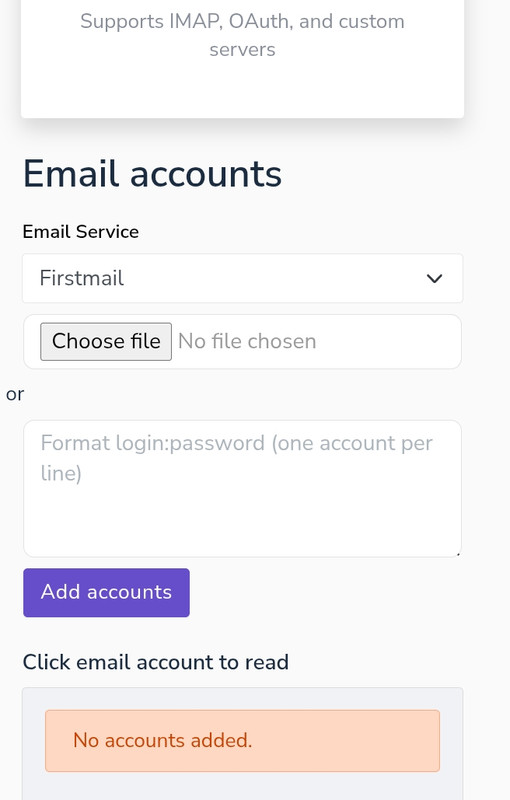
Step 1: Upload Accounts
Click the "Browse File" button to upload a text file from your computer containing email accounts logins.
Each line in the file should contain an email and password in the format: email:password and for oauth login like in hotmail it should contain in this format: email:client_id:refresh_token.
Example file content:
email1@rambler.ru:pass1
email2@rambler.ru:pass2
email3@rambler.ru:pass3
OR: Add Accounts Manually
Enter email accounts directly into the text box, one per line.
Click the "Add Accounts" button to add them to the list.
Step 2: Apply Filters
Use the Service dropdown to select the email provider (e.g., Gmail, Hotmail).
Enter the number of emails to fetch in the Number of Emails field.
Optionally, filter emails by sender using the Filter by Sender field.
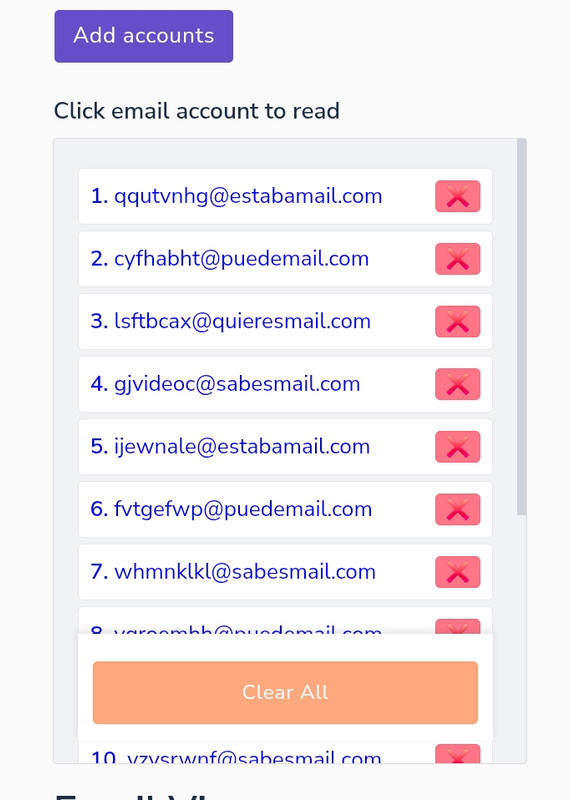
Step 3: Select an account to read email
Click on an account from the list on the left to read emails in the email viewer panel.

이 버전의 제품은 United States에서 활성화할 수 없습니다.
제품 지역은 다음과 같이 제한됩니다.:
귀하의 국가:
United States
이 제품 버전에 허용되는 국가 목록:
 GamerProtect로 안전하게 쇼핑하세요
더 많은 E-Mail 부스팅을 찾고 계십니까?주요 E-Mail 부스팅 카테고리를 방문하십시오.









지원
법률






Copyright © 2025 Z2U.com All rights reserved E-mail: Support@z2u.com
Company: Macro Excellence Technology Limited Address: FLAT A516, 5/F, EFFICIENCY HOUSE, 35 TAI YAU STREET, SAN PO KONG, KOWLOON, HONG KONG
 USD ($)
 한국어
한국어  도움말 센터