


Big Walk

Big Walk has quickly become one of 2026’s most notable cooperative games. Publisher Panic announced that the adventure sold more than one million copies in only six days, an impressive result for a game built entirely around long-form multiplayer cooperation. Developed by House House, the studio behind Untitled Goose Game, it sends groups of friends into a large open world filled with unusual puzzles, communication challenges, tools, toys, and opportunities to get completely lost.Although Big Walk looks relaxed, new players can easily become confused by its lack of quest markers, unusual voice system, host-controlled progression, and limited inventory. For players who want to get started quickly, choosing to Buy Big Walk Account can also provide another way to jump into the adventure with friends. This beginner’s guide explains how to prepare your group, choose the best starting route, manage essential items, communicate over long distances, and avoid the most common early mistakes without revealing the ending or complete puzzle solutions.
Big Walk Beginner Overview
| Feature | What Beginners Need to Know |
|---|---|
| Player count | Supports 2 to 12 players |
| Single-player | No full single-player mode |
| Matchmaking | Random matchmaking is not available |
| Crossplay | Supported across PC, Mac, PS5, and Nintendo Switch 2 |
| Save system | All progress is saved automatically by the host |
| World setting | Host chooses a 2-player, 3-player, or 4+ player puzzle configuration |
| Communication | Proximity voice, proximity text, gestures, and communication tools |
| Recommended first objective | Complete the tutorial area, then focus on the red tower |
| Current version | Version 1.4.9 according to the official version history |
Choose the Right Host Before You Begin
Your first major decision happens before anyone enters the world. All progress is connected to the host’s save file. When the host ends the session, everyone else is disconnected. To continue the same journey later, that host must return and start the saved game again.
Choose someone who:
Can regularly join future sessions
Has a stable internet connection
Can run the game at a reliable frame rate
Is unlikely to delete or abandon the save
Is comfortable organizing the group
Host performance is particularly important. The official troubleshooting guide explains that a low host frame rate or unstable host connection can cause movement problems, voice interruptions, and other network issues for the entire group.Version 1.4.9 also requires session passwords when starting a game. Do not reveal the password or Join Code during a livestream, because anyone with the required information may be able to enter the session.
Select the Correct Player Configuration
Each time the host starts a session, they must select a 2-player, 3-player, or 4+ player version of the world. According to the official Big Walk FAQ:
The selected setting adjusts how certain challenges are configured.
It does not limit the total number of players who can join the session.
Treat the setting as the minimum number of players who will participate consistently.
If some friends may leave before the session ends, choose a lower player setting.
Smaller groups provide a more focused cooperative experience.
Larger groups, especially those approaching 12 players, create a more chaotic social experience.
There is no single ideal group size. Big Walk supports groups of 2 to 12 players.
For example, if six friends join initially but only three are likely to remain for the entire session, selecting the 3-player world is the safer choice. This helps ensure that later challenges remain suitable for the number of players consistently available.
Complete the Tutorial Before Exploring Freely
According to GameSpot’s beginner guide, the opening section functions as a practical tutorial. Your group must complete four nearby puzzles, obtain and shape a key, and use it to lower a footbridge around the mountain.
Do not rush through this area or let an experienced player complete everything alone. The tutorial introduces several mechanics that return throughout the adventure:
Picking up and moving objects
Pointing and using arm gestures
Coordinating simultaneous actions
Sharing information between players
Understanding how keys and machines interact
Working without conventional quest instructions
Once the bridge is lowered, the island becomes much more open. Your group can travel in several directions, but completely unplanned exploration may cause players to lose important objects or forget which puzzles they have already discovered.
Start With the Red Tower
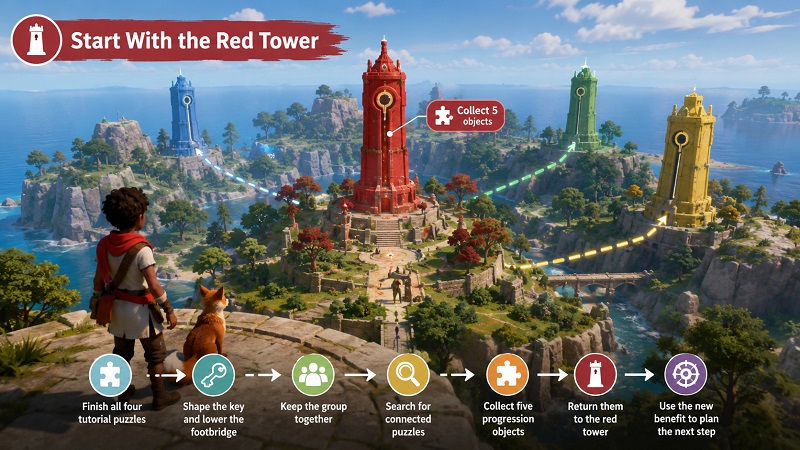
The main open area contains red, blue, green, and yellow towers. Each tower is connected to nearby cooperative puzzles. Solving those puzzles awards unusual objects that can be inserted into a tower’s central mechanism.The game does not force a strict tower order, but the red tower is the best first destination. It is relatively close to the starting area, and GameSpot recommends collecting five puzzle objects for it before moving deeper into the island. Its reward makes later navigation considerably easier.
A practical opening route is:
Finish all four tutorial puzzles.
Shape the key and lower the footbridge.
Keep the group together while locating the red tower.
Search the surrounding area for its connected puzzles.
Collect five progression objects.
Return them to the red tower.
Use the newly available benefit to plan the next destination.
After completing the red tower, choose one other colored tower and explore its surrounding region. Focusing on one area at a time makes it easier to remember incomplete puzzles and retrieve dropped equipment.
Use In-Game Communication, Not Discord
Communication is the central mechanic of Big Walk. The official proximity voice system changes according to the environment:
Voices become quieter as players move apart.
Speech may echo through corridors.
Walls can make voices sound muffled.
Soundproof barriers can block communication.
Walkie-talkies add a radio effect.
The official FAQ strongly discourages external voice programs. Discord will not trigger an in-game punishment, but it bypasses the distance and environmental restrictions that make many puzzles interesting.Players without microphones can use in-game text chat. Text follows similar rules: distant messages may become unreadable, soundproof barriers can block them, and walkie-talkies can transmit them.
Before separating, agree on a few simple nonverbal signals:
One raised arm means “ready.”
Both arms raised mean “action completed.”
Repeated waving means “come here.”
Pointing at the ground means “stand here.”
One flashlight blink means “yes.”
Two blinks mean “no.”
A flare means “regroup at this location.”
These are not official commands, but establishing a shared visual language can prevent confusion when speech is unavailable.
Find Backpacks and Belts Early
Every player initially carries only one object in their hands. Falling down a slope can cause that item to bounce into a forest, roll down a mountain, or disappear from view.Look for blue structures while exploring. Some contain backpacks or belts, each capable of storing an additional item. With one object in hand, one in a backpack, and one on a belt, a player can carry up to three objects.Stored equipment is also more secure because it will not be dropped during a fall. However, the cooperative design introduces an important restriction: players need a friend to attach or remove equipment from their own back or waist.
Useful group roles include:
Navigator: map or binoculars
Communicator: walkie-talkie or written sign
Scout: binoculars, laser pointer, or flare
Light carrier: flashlight or another portable lamp
Utility carrier: temporary keys and puzzle equipment
Free-handed helper: available to carry unexpected objects
Do not give every player the same tool. A varied loadout reduces backtracking.
Preserve Important Items Between Sessions
The gym area where sessions begin contains a Lost and Found table. Items being held when the host closes the session can appear on this table when the group returns. Backpacks, belts, and the items stored inside them also count.
Before ending a session, collect the equipment you want available next time:
Walkie-talkies
Flashlights
Binoculars
Backpacks
Belts
Useful communication tools
If nobody is holding an item, it normally returns to its original location. It is not permanently destroyed, but your group may need to cross the island again to retrieve it.
Use More Than Walkie-Talkies
The official game description confirms that players can discover walkie-talkies, laser pointers, binoculars, megaphones, flares, whiteboards, cowbells, and other unusual tools.Walkie-talkies are useful when teams split up, but they are not the only long-distance option. Players can write messages on signs, use binoculars to read information from afar, communicate through tower radio stations, fire flares from tower locations, or create simple signals with lights.According to PC Gamer’s analysis of the game’s communication systems, the hardest part is often not understanding a puzzle. The real challenge is transporting the correct objects, staying in contact, and recovering when a player gets lost or drops an essential tool.
Prepare for Extremely Dark Nights
The island’s night cycle can make paths, cliffs, gestures, and puzzle objects very difficult to see. At least one player in every exploration group should carry a light source.
Before beginning a puzzle that separates players, check:
Whether everyone can see the required objects
Whether a player’s body color blends into the background
Whether the group has a flashlight or portable lamp
Whether a backup signal has been established
Whether somebody knows the route back
Getting lost is not a failure. Big Walk has no traditional combat or death penalty, so falling, dropping an object, or taking a long detour is usually recoverable.
Use Trains and Other Transportation Carefully
Transportation systems eventually make long journeys more convenient, but they do not eliminate the importance of walking. The train continues moving unless someone aboard holds the brake. Stations display its current position, allowing players to decide whether to wait or continue on foot.The train and chairlift are not necessarily the fastest options. They are valuable because they provide new views of the island, reveal landmarks, and sometimes offer more direct routes between important regions.
Final Advice for Solving Puzzles
Most puzzles reward observation and communication rather than complicated logic. When stuck:
Examine the puzzle from different physical angles.
Look for colors, shapes, numbers, sounds, or matching structures.
Check whether players need to stand in separate locations.
Try gestures when speech is blocked.
Search the surrounding landscape for connected clues.
Leave the area and return later with better tools if necessary.
You do not need to complete every puzzle to reach the credits, although GameSpot reports that most must be solved. Players seeking full completion will have reasons to return for the remaining challenges, while those looking for a convenient way to begin their own journey can also consider a Cheap Big Walk Account before setting out with friends. The best way to enjoy Big Walk is not to rush. Select a dependable host, complete the tutorial together, prioritize the red tower, protect your essential tools, and accept that getting lost is part of the adventure.









SUPPORT
LEGAL
Policies






 USD ($)
 English
  Help Center