








Discord is giving users more ways to personalize their profiles with a major update to its badge system. Announced on November 9, 2026, the latest Discord Profile Badges Update introduces four free activity-based badges, a new Badge Directory, rarity classifications, and expanded customization options. These improvements allow users to showcase their gaming history, streaming activity, and time spent on the platform. Unlike traditional badges associated with Nitro subscriptions or special community programs, the new badges reward everyday activities. Whether you're a dedicated gamer, an active streamer, or a longtime Discord member, the update offers new opportunities to highlight your achievements. For users looking to explore different account options, Buy Discord Accounts on Z2U to compare available listings, prices, and seller ratings before choosing an account that suits your preferences. With the new badge system, Discord profiles are becoming more personalized and expressive than ever.
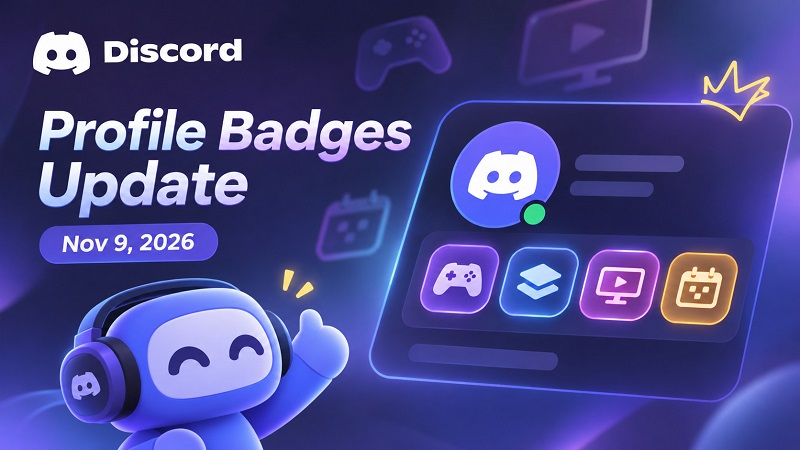
Discord November 2026 Badge Update: What's New?
The update makes Discord's badge system more accessible, informative, and customizable. Users can now explore available badges, understand their unlock requirements, and track eligible achievements through a centralized interface.
Here is a quick overview of the major changes:
| Feature | What's New |
|---|---|
| Release Announcement | November 9, 2026 |
| New Badges | Game Time, Game Variety, Streaming, Account Age |
| Badge Cost | All four new badges are free |
| Badge Directory | Browse badges and check unlock requirements |
| Rarity System | Common, Rare, Epic, Mythic |
| Badge Progress | Track progress toward eligible milestones |
| Profile Display | Up to six badges displayed prominently |
| Customization | Hide badges or rearrange them with Nitro |
| Platform Availability | Desktop and web, with limited mobile rollout |
The biggest change is that users can earn new badges simply by participating in activities they already enjoy on Discord.
Four New Discord Profile Badges and How to Unlock Them
Discord has introduced four badges that recognize gaming activity, streaming participation, and account history. Each badge has different eligibility requirements, and certain badges can upgrade as users reach additional milestones.
1. Game Time Badge: Show Your Gaming Dedication
The Game Time Badge recognizes users based on their accumulated gaming hours.
Unlock requirement: Play games recognized by the Discord desktop application.
Tracking start date: December 8, 2025.
Progression: Additional qualifying gaming time contributes toward higher milestones.
Important restriction: Console and mobile gaming activity does not currently count.
Players who regularly use Discord while gaming may already have eligible activity recorded. However, Discord must recognize the game for its playtime to contribute.
2. Game Variety Badge: Rewarding Different Gaming Experiences
The Game Variety Badge rewards users who explore a wider selection of games.
Unlock requirement: Play different games recognized by Discord.
Progression: Discovering additional eligible titles contributes toward badge milestones.
Tracking method: Discord identifies games through its desktop client.
Important restriction: Different experiences within Roblox or Fortnite are not counted as separate games.
Unlike Game Time, this badge focuses on the variety of games played rather than the total number of hours spent gaming.
3. Streaming Badge: Recognizing Discord Screen Sharing
The Streaming Badge highlights users who regularly share their screens or stream activities through Discord.
Unlock requirement: Accumulate eligible Discord screen-sharing time.
Tracking start date: January 1, 2024.
Participation requirement: At least one other person must be present in the call.
Important restriction: Mobile streaming activity does not currently contribute.
This badge specifically recognizes Discord's own screen-sharing functionality. Streaming hours accumulated exclusively on Twitch or YouTube do not automatically qualify.
4. Account Age Badge: Celebrating Longtime Members
The Account Age Badge recognizes how long someone has maintained their Discord account.
Unlock requirement: Have a Discord account that is at least one year old.
Progression: Additional account anniversaries contribute toward higher milestones.
Activity requirement: No gaming or streaming activity is necessary.
Special feature: Previously earned account-age milestones do not decrease.
This badge gives longtime Discord users a way to display their history on the platform without requiring a paid subscription.
Important: Discord has not publicly provided a complete numerical breakdown of every badge level. Users should check the Badge Directory for available progression details rather than relying on unofficial milestone estimates.
Discord Badge Directory: A New Way to Explore Achievements
One of the most useful additions is the Badge Directory, a centralized location for discovering and managing Discord profile badges. Previously, users often needed to search for explanations of unfamiliar badges. The new directory provides information directly within Discord.
What Can You Do With the Badge Directory?
Explore earned badges: View achievements already associated with your account.
Discover locked badges: Find additional badges and learn how to obtain them.
Check unlock requirements: Understand the activities or milestones needed for specific badges.
Monitor badge progression: Track progress toward eligible upgrades.
View badge rarity: See how common or uncommon different badges are.
Inspect other profiles: Learn more about badges displayed by other users.
The directory also highlights badges with existing progress, making it easier to identify achievements that may be close to unlocking.
Discord Badge Rarity Levels Explained
Discord's updated badge system includes four rarity classifications. These categories help users understand how frequently different achievements appear across the community.
| Rarity Level | Description |
|---|---|
| Common | Badges owned by a relatively large number of users |
| Rare | Less frequently obtained badges |
| Epic | Uncommon achievements held by fewer members |
| Mythic | Particularly rare badges within the community |
Badge rarity is based on ownership rather than competitive performance. It does not provide gameplay advantages, additional permissions, or special account privileges. Rarity classifications may also change as more users earn particular badges. Additionally, not every badge necessarily progresses through all four rarity categories.
How to Customize Your Discord Profile Badges?
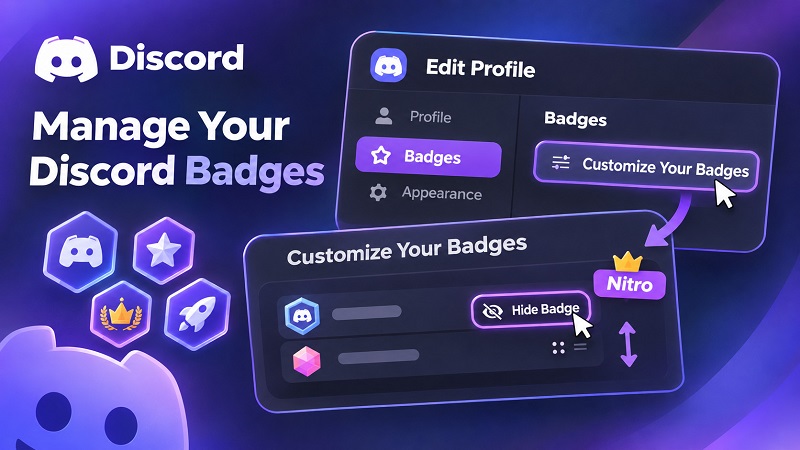
The update also improves how badges appear on Discord profiles. Users can prominently display up to six badges, while additional achievements remain accessible through the Badge Directory.
How to Hide or Manage Discord Badges?
Follow these steps on the desktop or web version of Discord:
Open Discord and access your profile.
Select Edit Profile.
Navigate to the Badges section.
Open Customize Your Badges.
Choose an eligible badge and select Hide Badge if you do not want it displayed.
If you subscribe to Nitro, drag badges into your preferred order.
Save your changes.
Hiding a badge does not permanently remove it from your account. Users can restore eligible hidden badges later.
Free Discord vs. Nitro: Badge Customization Differences
Both free users and Nitro subscribers can earn the four new activity-based badges. However, Nitro provides additional control over profile presentation.
| Feature | Free Discord | Discord Nitro |
|---|---|---|
| Unlock four new badges | Yes | Yes |
| Access Badge Directory | Yes, when available | Yes, when available |
| View badge rarity | Yes | Yes |
| Hide eligible badges | Yes | Yes |
| Manually rearrange badges | No | Yes |
| Customize displayed badge order | No | Yes |
Nitro subscribers can arrange their badges to highlight their favorite achievements. If their subscription expires, Discord restores the default badge ordering. Certain badges, including the Nitro subscription badge, may have restrictions on hiding.
Discord Badge Tracking Requirements and Limitations
Before attempting to unlock the new badges, users should understand several important restrictions.
Desktop activity is essential. Game Time, Game Variety, and Streaming progression relies on qualifying activity recognized by the Discord desktop application.
Data personalization must be enabled. Users need to activate the relevant data personalization setting for eligible gaming and streaming activity to count.
Historical activity has limits. Game Time tracking begins on December 8, 2025, while eligible Streaming activity is counted from January 1, 2024.
Progress updates may be delayed. Badge milestones do not always update immediately after completing an activity.
Mobile availability remains limited. The Badge Directory is still being introduced to selected mobile users, so not everyone will see the same interface.
These restrictions are particularly important for users who primarily play games on consoles or mobile devices.
What Happens to Existing Discord Badges?
The November 2026 update does not replace Discord's existing badge collection. Previously available badges, including Nitro, Server Boosting, Quests, and historical community achievements, remain part of the platform. Some legacy badges, such as Early Supporter, are associated with discontinued eligibility periods and cannot be earned through their original programs. Discord also maintains an important account restriction: profile badges cannot be transferred between accounts. Even if users stop using an account, its earned badges cannot be moved to another profile.
Why the Discord November 2026 Badge Update Matters?
The new badge system represents a shift toward recognizing everyday participation rather than relying primarily on subscriptions, special programs, or limited-time opportunities. For gamers, Game Time and Game Variety offer new ways to showcase their gaming interests. For users who frequently share their screens, the Streaming badge highlights social participation. Meanwhile, Account Age recognizes longtime members without requiring additional activities. The Badge Directory also makes achievements easier to discover, potentially encouraging users to explore different Discord features. Most importantly, all four new badges are free, making the updated system accessible to users without Nitro subscriptions.
Final Thoughts
Discord’s November 9, 2026 profile badge update introduces four free achievements, a centralized Badge Directory, rarity classifications, and improved profile customization tools. Although some features are still rolling out, the update gives users more ways to display their gaming history, streaming participation, and account milestones. Players interested in collecting badges should review the eligibility requirements, check their Badge Directory, and monitor their progress as additional features become available. For those looking to further enhance their Discord experience, Z2U offers Cheap Discord Subscriptions, allowing users to compare affordable subscription options and explore additional profile customization features. As Discord continues expanding its personalization tools, badges and subscription benefits provide more ways for users to express their interests, showcase achievements, and stand out in the community.









SUPPORT
LEGAL
Policies


 USD ($)
 English
 Help Center