


How to Find Your 17-Digit SteamID?
1,Click your profile name in the upper-right corner. It's at the top of the screen, next to the notification bell icon. 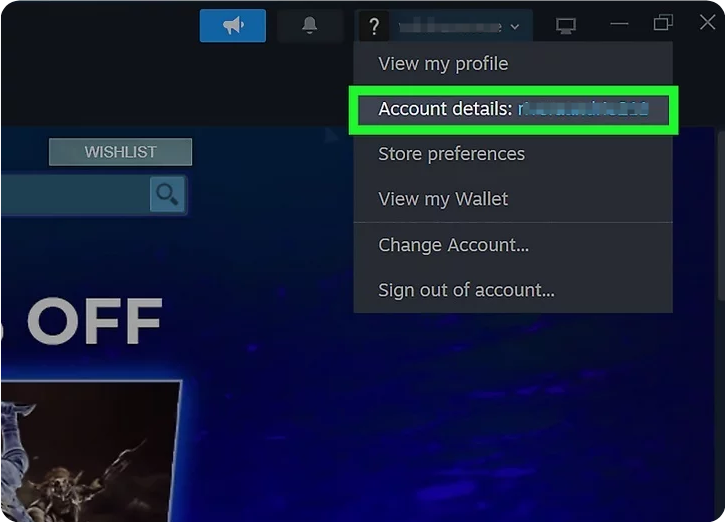
2,Click Account Details. This will open a new window with all of your Steam account information.
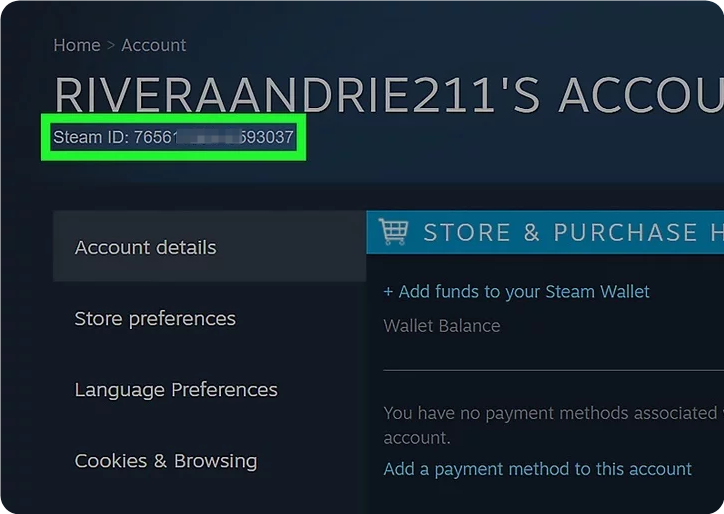
3,Look for your SteamID at the top of the page. Your SteamID is listed under the header that says "[account name]'s Account."
Did you find it helpful?











SUPPORT
LEGAL
Policies






Copyright © 2026 Z2U.com All rights reserved E-mail: [email protected]
Company: Macro Excellence Technology Limited Address: FLAT A516, 5/F, EFFICIENCY HOUSE, 35 TAI YAU STREET, SAN PO KONG, KOWLOON, HONG KONG
 USD ($)
 English
  Help Center